Lesson 1 · Start here
Your first safe conversation with Claude
A gentle first lesson for an accountant who may later use Claude Chat, Claude Cowork, Claude for documents/spreadsheets, or Claude Code.
Primary source
Anthropic's official Get started with Claude says Claude can be accessed through web, desktop, and mobile; that you communicate with Claude using prompts; and that good first habits are to start simple, be specific, and iterate with follow-up questions.
The scaffold: what you will learn in this mini-course

We will learn Claude in this order:
- Claude Chat: ask questions, draft, summarize, revise.
- Files and outputs: use Claude for tables, checklists, spreadsheets, presentations, PDFs, and document drafts.
- Claude Cowork: delegate longer multi-step office tasks, when available in her plan.
- Claude Code: recognize it and use only the basics if the job surprisingly requires technical work.
Keep the Claude Surfaces Quick Guide nearby as the one-page map.
Today's one idea
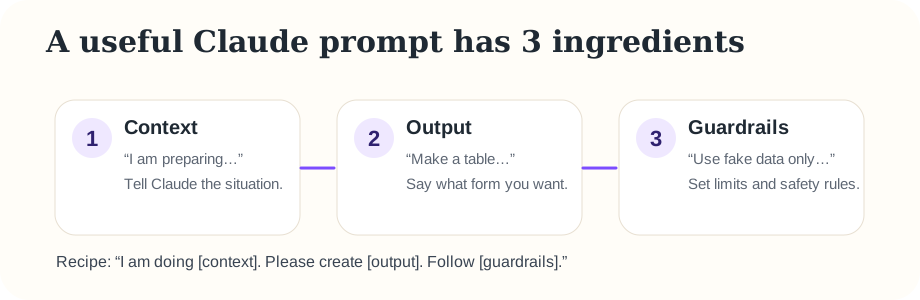
A prompt is the message you type to Claude. Think of Claude like a careful assistant: it performs better when you explain the situation, the desired output, and the limits.
The accounting safety habit
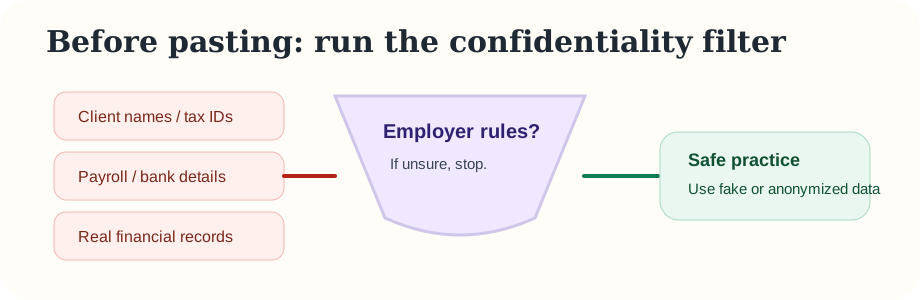
For practice, use fake or anonymized information. Do not paste client names, payroll details, bank statements, tax IDs, or confidential company numbers until the employer confirms what is allowed.
Practice: send one safe prompt
- Open claude.ai.
- Start a new chat.
- Paste this prompt:
I am new to using AI at work. I am an accountant preparing for month-end close. Create a simple checklist with no confidential company details. Use plain language.
- Read Claude's answer.
- Now improve it with a follow-up:
Make it shorter and turn it into a table with columns: Task, Why it matters, What to check.
Why the follow-up matters
You do not need to get the perfect prompt on the first try. Claude is conversational. A normal workflow is:
Ask → read → correct → ask again → use only after review.
This habit will transfer to every Claude surface: Chat, Cowork, document creation, spreadsheets, and even Code.
Quick check
Question: Which prompt is best for a first safe accounting practice task?
B = “Create a month-end checklist using fake data only.”
C = “Here are private payroll records; summarize them.”
Memory practice
Without looking above, say the three ingredients of a useful prompt.
Show answer
Context, output, guardrails.
Ask the teaching agent
If anything feels unclear, ask: “Can you explain this more slowly for someone who has never used AI?”