Lesson 4 · Files and documents
Work safely with documents in Claude
Learn when to upload a file, how to ask Claude useful questions about it, and what to review before trusting the result.
Primary source
Anthropic's official Upload files to Claude explains that files can be attached using the “+” button or by dragging and dropping files into the chat. Anthropic's file creation guide also notes that Claude can create downloadable workplace files.
The one idea
Uploading a document lets Claude read it and answer questions about it. But for accounting work, the safest habit is:
Check permission → remove sensitive details → ask a narrow question → review the answer.
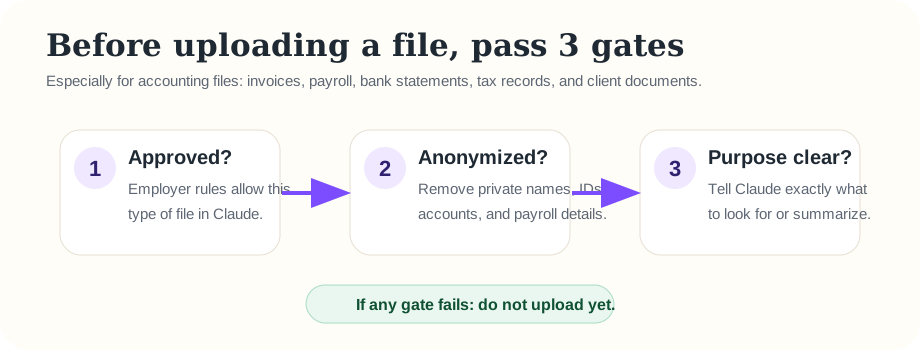
What not to upload yet
Until the employer confirms the rules, do not upload real client records, payroll files, bank statements, tax IDs, Social Security numbers, account numbers, or confidential financial statements. Practice with fake or anonymized files.
Ask better questions about a file
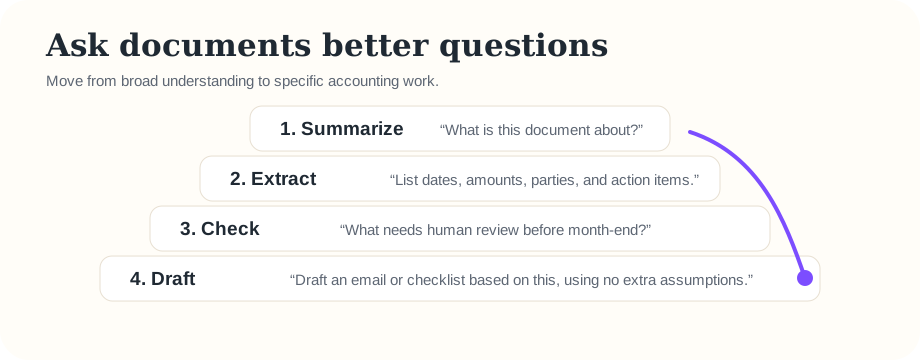
Summarize
Summarize this document in 5 bullets. Do not add outside information.
Extract
Extract all dates, amounts, vendor names, and action items into a table.
Check
List anything that needs human review before month-end close.
Draft
Draft a polite follow-up email based only on this document.
Practice with fake text
Instead of uploading a real file, paste this fake document into Claude:
Fake invoice note: Vendor: Northside Supplies. Invoice date: March 3. Amount: $1,240. Payment terms: Net 30. The invoice is missing a purchase order number. The department manager approved by email, but the approval date is unclear.
Then ask:
Create a table with columns: Item, Detail, Risk, What I should verify. Use only the information above.
Practice follow-up
After Claude answers, ask:
What should I not assume from this note?
This question is powerful because it teaches Claude to separate what the document says from what might merely be guessed.
Quick check
Question: Which is the safest first step before uploading a real client invoice?
B = Check employer rules.
C = Ask Claude to decide.
Memory practice
From memory, say the four-step document habit.
Show answer
Check permission → remove sensitive details → ask a narrow question → review the answer.
Ask the teaching agent
If she has a document task, ask: “Can you help me make a safe, anonymized version of this file prompt before I use Claude?”